
Smart SIM Registration Requirements (2026): Accepted IDs & Documents Guide
Before registering your Smart SIM card in the Philippines, it’s important to understand the official Smart SIM registration requirements. Having the correct documents and a valid government-issued ID can make the registration process faster and help prevent delays or verification issues.

Whether you’re a prepaid subscriber, postpaid user, foreign national, or registering a SIM for a minor, the required documents may vary depending on your situation. Preparing everything in advance can save time and ensure your registration is completed successfully.
This guide explains the Smart SIM registration requirements for 2026, including accepted IDs, eligibility rules, required documents, and helpful tips based on the latest official guidelines.
For more helpful guides on Philippine government services, visit PNPPayslips.com.
What Are the Smart SIM Registration Requirements?
To complete your Smart SIM registration, you generally need to provide accurate personal information along with a valid identification document. During registration, you will also be asked to verify your identity through a clear photo or selfie.
Before starting the registration process, make sure you have the following ready:
- An active Smart SIM card
- A mobile phone with internet access
- A valid government-issued ID
- Personal information that matches your ID
- A clear selfie for identity verification
- A valid email address (if required)
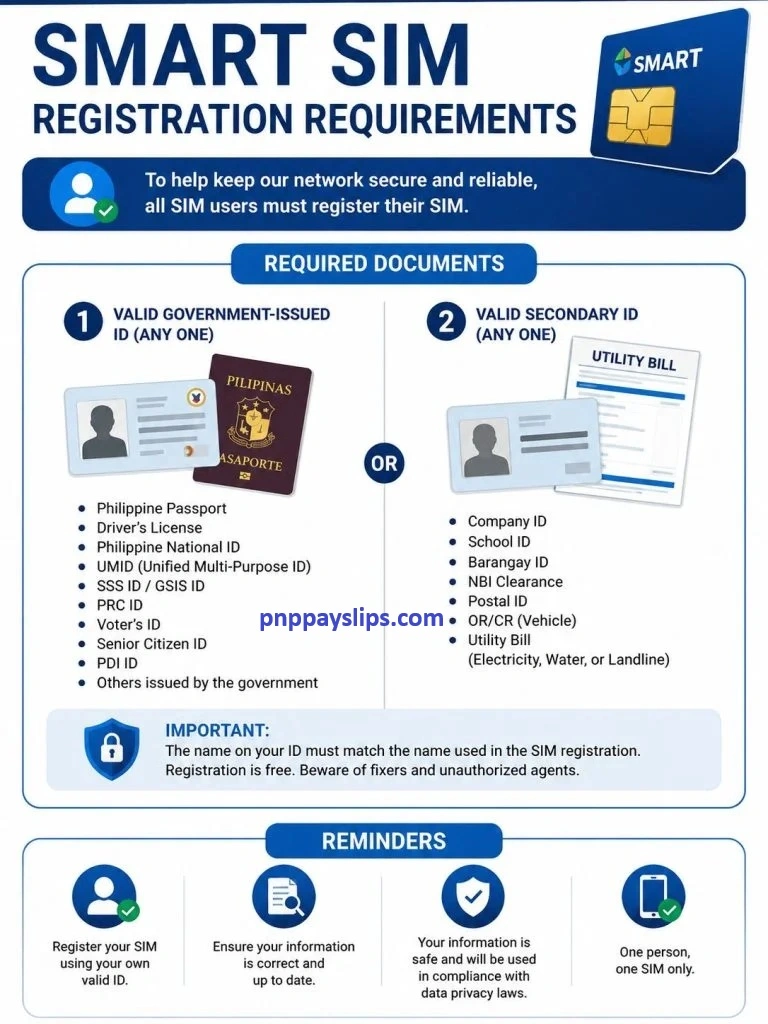
Providing accurate information is important because any mismatch between your details and identification documents may delay or prevent successful registration.
Who Needs to Register a Smart SIM?
SIM registration applies to most Smart subscribers in the Philippines.
You should register if you are:
- A Smart prepaid user
- A Smart postpaid subscriber (if registration is required for your account)
- A TNT subscriber
- A Smart Bro user
- A foreign visitor using a Smart SIM
- A parent or legal guardian registering a SIM for a minor
If you recently purchased a new Smart SIM, registration should be completed before using all network services.
Accepted IDs for Smart SIM Registration
One of the most common questions users ask is which identification cards are accepted during registration.
Generally, Smart accepts various valid government-issued IDs for identity verification.
Some commonly accepted IDs include:
- Philippine Passport
- Philippine National ID (PhilSys ID)
- Driver’s License
- Unified Multi-Purpose ID (UMID)
- Social Security System (SSS) ID
- Government Service Insurance System (GSIS) e-Card
- Professional Regulation Commission (PRC) ID
- Voter’s ID (where applicable)
- Postal ID
- Senior Citizen ID
- Person with Disability (PWD) ID
- Integrated Bar of the Philippines (IBP) ID
- National Bureau of Investigation (NBI) Clearance
- Police Clearance
Foreign nationals may also use documents such as:
- Passport
- Visa or immigration documents
- Alien Certificate of Registration (when applicable)
- Other government-issued travel documents required under Philippine regulations
Always use an identification document that is valid, readable, and not expired.
Information Required During Registration
When filling out the registration form, you’ll typically be asked to provide personal details such as:
- Full legal name
- Date of birth
- Gender
- Nationality
- Residential address
- Mobile number being registered
- ID type
- ID number
Ensure that every detail matches the information shown on your identification document to avoid verification problems.
Requirements for Minors
Minors can also have a Smart SIM registered, but the registration is generally completed under the supervision of a parent or legal guardian.
The registration may require:
- The minor’s personal information
- The parent or guardian’s valid government-issued ID
- Proof of the relationship when required
- The mobile number being registered
Parents or guardians should carefully review all information before submitting the application.
Smart SIM Registration Requirements for Foreign Nationals
Foreign visitors staying in the Philippines may also register a Smart SIM, provided they meet the applicable requirements.
Depending on the purpose and duration of their stay, they may be asked to provide:
- Passport
- Visa or travel documents
- Proof of Philippine address (when applicable)
- Return or onward travel details, if required
- Other supporting documents requested during verification
Requirements may differ depending on the subscriber’s immigration status, so it’s always best to follow the latest official guidance during registration.
Tips Before Uploading Your ID
Many registration delays happen because uploaded identification documents are unclear or incomplete.
To improve your chances of successful verification:
A clear, high-quality image helps speed up the verification process.
Common Mistakes to Avoid
Many registration problems can be prevented by avoiding these common errors:
- Entering an incorrect name or date of birth
- Using an expired ID
- Uploading blurry ID images
- Providing incomplete personal information
- Taking an unclear selfie
- Registering with incorrect mobile number details
Double-checking your information before submitting the registration form can help reduce the risk of rejection.
What Happens After You Submit Your Registration?
Once you submit your Smart SIM registration application, your details are reviewed to verify your identity and the information you provided. If everything is accurate, your registration will be processed successfully.
In some cases, you may receive a confirmation message or email after your registration has been approved. If additional verification is required, you may be asked to resubmit certain information or upload clearer documents.
To avoid delays, make sure your contact details remain active until the registration process is complete.
How Smart Verifies Your Information
During the registration process, Smart verifies the personal information you submit to help confirm your identity and comply with the SIM Registration Act.
The verification process generally checks:
- Your personal information
- The validity of your uploaded ID
- The quality of your ID photo
- Your selfie or identity verification image
- The consistency of the information provided
If your details match your identification document and the uploaded images are clear, your application is more likely to be approved without issues.
Why Your Registration May Be Rejected
Although the registration process is straightforward, some applications may be rejected due to incorrect or incomplete information.
Common reasons include:
- Blurry or unreadable ID photos
- Expired identification documents
- Incorrect personal information
- Name mismatch between the form and the ID
- Poor-quality selfie
- Duplicate or incomplete registration
If your registration is unsuccessful, carefully review the information and try again using accurate details and clearer images.
Tips for a Successful Smart SIM Registration
Following a few simple practices can help make your registration smoother.
✔ Prepare your documents in advance
Have your valid ID and personal information ready before opening the registration portal.
✔ Use a stable internet connection
A reliable internet connection helps prevent interruptions while uploading documents.
✔ Double-check your information
Review your name, date of birth, address, and ID number before submitting the form.
✔ Upload high-quality images
Ensure that both your ID and selfie are clear, well-lit, and free from glare or blur.
✔ Register only through the official Smart portal
To protect your personal information, always use Smart’s official registration website or authorized channels.
Conclusion
Understanding the Smart SIM registration requirements before starting the process can help you complete your registration without unnecessary delays. Preparing a valid government-issued ID, providing accurate personal information, and uploading clear verification images are some of the most important steps toward a successful application.
Whether you’re registering a prepaid SIM, postpaid account, Smart Bro SIM, or registering on behalf of a minor or foreign visitor, following the official requirements will make the process much easier.
For the latest announcements, accepted IDs, and registration guidelines, always use Smart’s official website and registration portal.