
Globe SIM Registration Guide (2026): How to Register Your SIM Online
Registering your Globe SIM is an important step to keep your mobile number active and comply with the Philippines’ SIM Registration Act. Whether you are using a prepaid SIM, postpaid plan, Globe At Home Prepaid WiFi, or TM SIM, completing the registration process ensures uninterrupted access to calls, text messages, mobile data, and other network services.
If you’re registering for the first time or simply want to understand the latest requirements, this Globe SIM Registration Guide will walk you through everything you need to know. From preparing the required information to completing the registration through the official Globe portal, this guide is based on official Globe resources and is designed to help you finish the process smoothly.
By the end of this guide, you’ll understand the registration requirements, accepted valid IDs, and the exact steps needed to register your SIM successfully.
For more helpful guides and the latest updates, visit our website, pnppayslips.com.
What Is Globe SIM Registration?
Globe SIM Registration is the official process of linking your SIM card to your personal identity as required under the SIM Registration Act (Republic Act No. 11934) in the Philippines.
The law requires mobile subscribers to register their SIM cards by providing accurate personal information and a valid government-issued ID. This measure helps reduce text scams, online fraud, identity theft, and other crimes involving anonymous SIM cards.
Globe allows eligible users to register through its official online registration portal or the GlobeOne app. During registration, subscribers must provide personal details, upload an accepted valid ID, and complete identity verification.
The registration process applies to:
- Globe Prepaid SIM users
- TM subscribers
- Globe Postpaid subscribers
- Globe At Home Prepaid WiFi users
- Globe Business mobile users
- Foreign nationals using Globe SIM cards in the Philippines
Completing the registration accurately helps avoid service interruptions and ensures your SIM remains compliant with Philippine regulations.
Who Needs to Register Their Globe SIM?
The SIM Registration Act covers nearly all Globe mobile subscribers. Whether you recently purchased a new SIM card or are already using Globe services, registration requirements may apply depending on your account type.
The following subscribers are generally required to register:
|
Subscriber Type |
Registration Required |
|---|---|
|
Globe Prepaid SIM |
Yes |
|
TM Prepaid SIM |
Yes |
|
Globe At Home Prepaid WiFi |
Yes |
|
Globe Business Mobile |
Yes |
|
Foreign Tourists |
Yes |
|
Foreign Residents |
Yes |
For Globe Postpaid subscribers, much of the required customer information is already available through their account records. However, Globe may still request confirmation or additional information whenever necessary.
If you’re registering on behalf of a minor, the registration must follow Globe’s official requirements for minor subscribers, which are discussed later in this guide.
Globe SIM Registration Requirements
Before starting the registration process, prepare all the required information to avoid delays or verification issues.
Having everything ready beforehand can help you complete the process within just a few minutes.
Personal Information Required
During registration, Globe may ask for the following information:
- Full name
- Date of birth
- Gender
- Nationality
- Residential address
- Mobile number being registered
Ensure that all information matches the details shown on your
Selfie Verification
Depending on your registration method and account type, Globe may request a selfie for identity verification.
When taking your selfie:
- Use good lighting.
- Keep your face fully visible.
- Remove sunglasses or anything covering your face.
- Avoid blurry photos.
- Follow the instructions shown during registration.
Valid Government-Issued ID
One of the most important requirements is a valid government-issued identification card.
The ID should:
- Be valid and not expired
- Display your full name clearly
- Show your photograph
- Be readable and free from blur
- Match the information entered during registration
Globe verifies your identity using the uploaded ID
Accepted Valid IDs for Globe SIM Registration
Globe accepts several government-issued identification documents for SIM registration. Always refer to the official Globe registration portal for the most up-to-date list of accepted IDs.
Below are some commonly accepted IDs:
|
Accepted Valid ID |
Filipino Citizens |
Foreign Nationals |
|---|---|---|
|
Philippine National ID (PhilSys ID) |
✔ |
— |
|
Passport |
✔ |
✔ |
|
Driver’s License |
✔ |
✔ (if applicable) |
|
UMID Card |
✔ |
— |
|
Social Security System (SSS) ID |
✔ |
— |
|
Government Service Insurance System (GSIS) ID |
✔ |
— |
|
Professional Regulation Commission (PRC) ID |
✔ |
— |
|
Postal ID |
✔ |
— |
|
Voter’s ID (if accepted by Globe) |
✔ |
— |
|
Senior Citizen ID |
✔ |
— |
|
Person with Disability (PWD) ID |
✔ |
— |
Foreign nationals may also be required to present additional travel or immigration documents depending on their residency status or the type of SIM registration being completed.
Always ensure that the ID you upload is valid, clear, and matches the personal information you provide during registration.
Before You Begin the Registration Process
Taking a few minutes to prepare can help you avoid common issues during registration.
Before opening the official Globe registration portal, make sure you have:
- Your Globe or TM mobile number
- A stable internet connection
- A valid government-issued ID
- A device with a working camera (if selfie verification is required)
- Your personal information ready for submission
It’s also a good idea to check that your mobile phone can receive One-Time Passwords (OTPs), as Globe may send a verification code to confirm your number during the registration process.
Once everything is ready, you can proceed with registering your SIM through Globe’s official website or the GlobeOne app.
How to Register Your Globe SIM Online
Registering your Globe SIM online is a straightforward process. Globe provides an official registration portal where eligible subscribers can securely submit their details and complete identity verification.
In the next section of this guide, you’ll learn the step-by-step registration process, including how to register through the official Globe website and the GlobeOne app, along with guidance for minors and foreign nationals.
How to Register Your Globe SIM Through the Official Website
Once you have prepared your personal information and valid ID, you can complete the registration through Globe’s official SIM registration portal.
Follow these steps:
Step 1: Visit the Official Globe SIM Registration Portal
Open your preferred web browser and go to Globe’s official SIM registration portal. Make sure you are using the official website to protect your personal information and avoid fraudulent pages.
Step 2: Enter Your Globe Mobile Number
Type the Globe or TM mobile number you want to register.
Double-check the number before proceeding to ensure you are registering the correct SIM.
Step 3: Verify Your Number Using the OTP
Globe will send a One-Time Password (OTP) to the mobile number you entered.
Enter the OTP within the required time to verify that you own the SIM card.
If you do not receive the OTP immediately, wait a few moments and request a new code if necessary.
Step 4: Fill in Your Personal Information
Provide the required personal details, including:
- Full name
- Date of birth
- Gender
- Nationality
- Residential address
Make sure every detail matches the information on your valid government-issued ID.
Step 5: Upload Your Valid ID
Take a clear photo or upload a scanned copy of your accepted government-issued ID.
For the best results:
- Ensure all text is readable.
- Do not crop important details.
- Avoid blurry or dark images.
- Upload the front and back of the ID if requested.
Step 6: Complete Selfie Verification
If prompted, take a selfie following the on-screen instructions.
To improve verification success:
- Face the camera directly.
- Use a well-lit area.
- Remove sunglasses, hats, or face coverings.
- Keep your entire face visible.
Step 7: Review and Submit
Before submitting your application, carefully review all the information you entered.
If everything is correct, confirm your agreement with the required declarations and submit your registration.
Step 8: Wait for Confirmation
After successful submission, Globe will display a confirmation message indicating that your registration has been received.
Keep a screenshot or save the confirmation for your records if needed.
How to Register Using the GlobeOne App
If you prefer using your smartphone, you can also register your SIM through the official GlobeOne app.
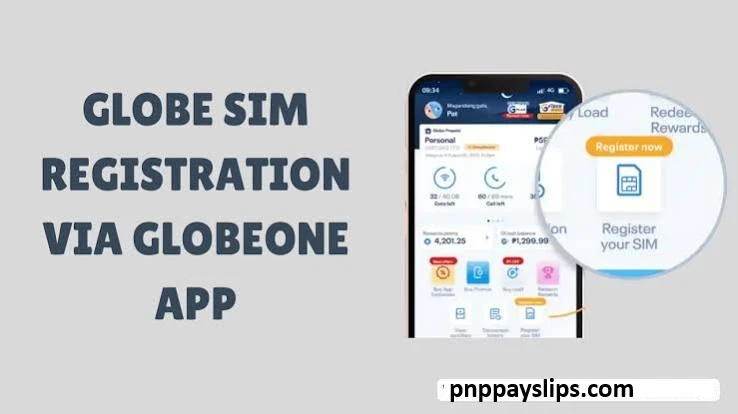
The process is similar to the web portal.
Simply:
- Install or update the GlobeOne app.
- Sign in to your Globe account.
- Select the SIM registration option.
- Verify your mobile number.
- Complete the registration form.
- Upload your valid ID.
- Complete selfie verification if required.
- Submit your application.
Using the GlobeOne app is a convenient option for users who already manage their Globe account through the application.
Globe SIM Registration for Minors
The SIM Registration Act also applies to minors.
However, since minors may not always have their own government-issued identification, Globe allows registration under the supervision of a parent or legal guardian in accordance with its official requirements.
Generally, the registration should include:
- The minor’s personal information
- The parent or legal guardian’s information
- The parent or guardian’s valid government-issued ID
The registered parent or guardian is responsible for ensuring that the information submitted is accurate.
Globe SIM Registration for Foreign Nationals
Foreign nationals using a Globe SIM in the Philippines must also complete SIM registration.
Depending on their immigration status, Globe may require additional documents besides a passport.
These may include:
- Passport
- Proof of legal stay in the Philippines
- Visa or immigration documents, when applicable
- Return or onward travel ticket for tourists, if required under Globe’s current policy
Since document requirements may change, always check Globe’s official SIM registration portal for the latest requirements before submitting your application.
Tips for a Successful Globe SIM Registration
Many registration delays happen because of simple mistakes that can easily be avoided.
Follow these tips to improve your chances of successful registration:
- Use only the official Globe registration website or GlobeOne app.
- Enter information exactly as it appears on your ID.
- Upload a clear and readable photo of your ID.
- Make sure your selfie is well-lit and not blurry.
- Use a stable internet connection throughout the registration process.
- Verify your mobile number carefully before requesting the OTP.
- Review all information before submitting the form.
Taking a few extra minutes to verify your information can help prevent delays during identity verification.
Conclusion
Completing your SIM registration is an important step toward keeping your Globe mobile services active while complying with the Philippines’ SIM Registration Act. Whether you use a prepaid SIM, postpaid account, TM SIM, or Globe At Home Prepaid WiFi, preparing the correct information and following the official registration process can make the experience quick and hassle-free.
This Globe SIM Registration Guide covered the essential requirements, accepted valid IDs, registration steps, and special guidelines for minors and foreign nationals. By using only Globe’s official registration channels and ensuring that your submitted information is accurate, you can avoid common verification issues and complete your registration with confidence.
For the latest announcements, updated document requirements, or policy changes, always refer to Globe’s official SIM registration resources before submitting your application.